
From Friday Deep-Dive · Friday, November 6, 2026 · 13 min read
The new ChatGPT image model, and seven jobs to give it
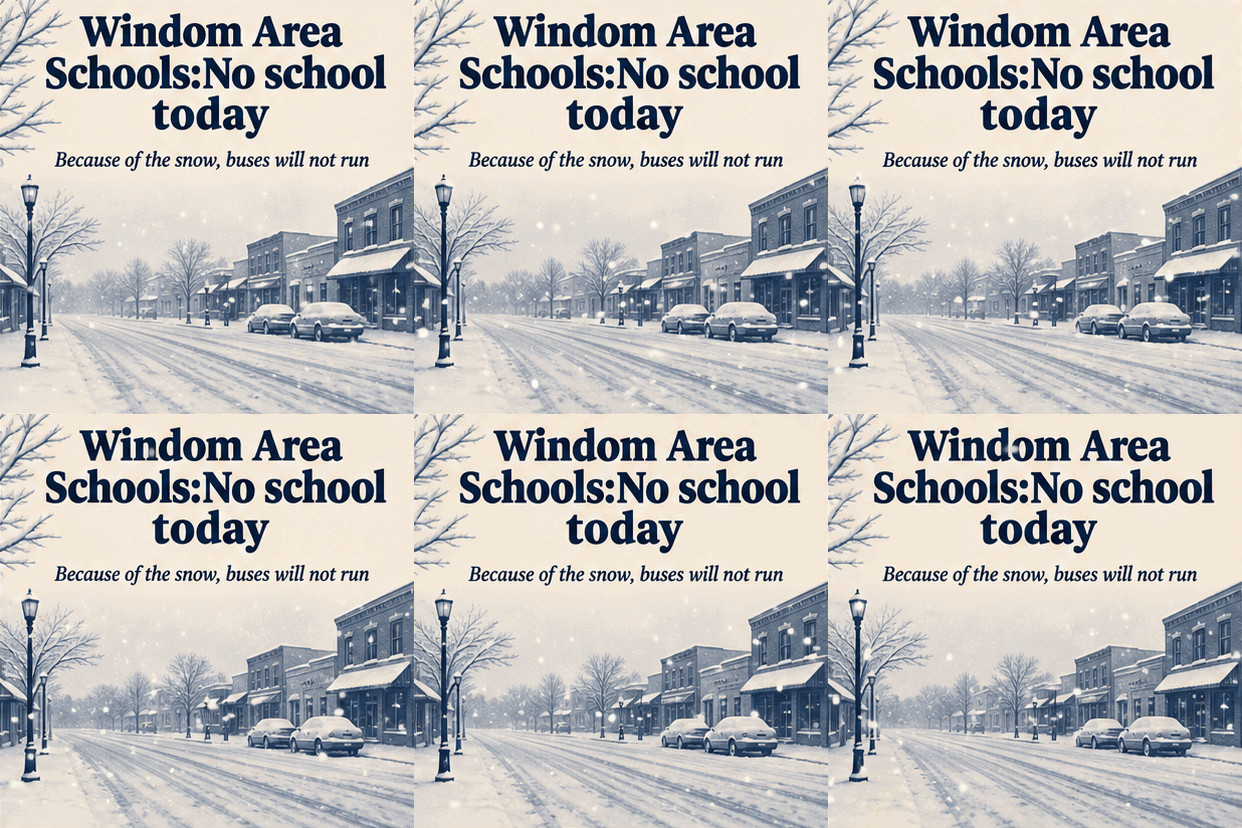
OpenAI shipped ChatGPT Images 2.6 on Wednesday, and the interesting part is the file types. ChatGPT can now make an animated GIF, so a school closing card can have snow falling on it, and it can save a character you reuse by name. Developers get SVGs, vector graphics that stay sharp from a browser tab to a full page, plus the point-at-it editing from 2.5. In the full post: how to find it in ChatGPT and whether you need to select anything, which file to ask for, seven copy-and-paste prompts, and five rules to follow before any of it touches your publication.

When Images 2.5 shipped, I wrote about the day you could finally point at the one thing that was wrong. That fixed the biggest complaint about AI images. The new version fixes a different one: the kinds of files you can get out of it.
On Wednesday, OpenAI released ChatGPT Images 2.6. It is in ChatGPT and Codex on every plan, on the web, desktop and phone. Developers get two new versions of it, which I cover near the end.
Below: what changed, how to get to it in ChatGPT, which file to ask for, seven jobs for a publication with a prompt for each, and five rules.
What changed
Here is the list. OpenAI's own claims are marked as OpenAI's.
- Animated GIFs. Ask for a GIF from a prompt or from a picture you already have. The advice from early guides is to ask for one small movement, like steam rising or a wave, with the camera held still. Say "GIF," not "video," or you may get something else. OpenAI says you can adjust the speed too.
- SVG graphics. A vector file, good for icons, badges and simple art. OpenAI lists this one for developers, not for ChatGPT itself. There is a short explainer at the bottom of this email.
- Pointing at the problem. The markup editing from 2.5 is still here, and OpenAI says it now comes to the developer side as well.
- Saved reference images. Save a picture of yourself, a pet or a character under a name and reuse it in new images.
- Speed. OpenAI says images come out about fifty percent faster. It has not said what it measured that against.
How to get to it in ChatGPT
The short answer: there is nothing special to select. Images 2.6 is on every ChatGPT plan, on the web, in the desktop app and on your phone, and OpenAI describes one way in for all three. Here is the order I would go in.
Update, or refresh.
On the web, reload the page. In the desktop app or on your phone, check for an update first. Rollouts can be staged, and some accounts see new features a few days late.
Ask in a chat, or open Images.
You can type what you want in an ordinary chat, the way you always have. Or click Images in the left sidebar, pick a template or type a prompt, and choose Create image. Everything you make is saved on the Images page, so you can find it later. OpenAI's help page lists that page for the web and the phone app. If your desktop app does not show it, use an ordinary chat.
Do not go looking for a model name.
Flare and Sunburst are developer names. OpenAI does not say you can pick between them in ChatGPT, and nothing in the launch material says you have to choose an image model first.
There is one setting worth knowing about. OpenAI's safety document for this release says ChatGPT users can adjust reasoning effort from the model picker, the menu where you choose which model you are talking to, and that this changes how fast it generates and edits. The label on your screen may differ. Leave it alone for your first few tries.
For a GIF, ask in plain words.
Type something like "Make a short looping animated GIF of [what you want]," or upload a still image and ask for it to be animated. When it comes back, open it to change the speed, save it or share it. To change the GIF itself, describe the change in the chat. ChatGPT cannot edit an animated GIF you upload, so upload a still.
GIF creation is rolling out in stages, and some accounts did not have it on day one. OpenAI has not described a setting that shows which image model your account uses, so the practical test is to ask for a short looping GIF. If you get one that moves, you have it.
For a character, save it under a name.
Upload a picture of a character, yourself or a pet, give it a name and save it as a reference. After that, type @ and the name in a prompt and ChatGPT pulls it in without a new upload. OpenAI's own example is a dog saved as Pepper, then a request for a watercolor portrait of @Pepper. Job 7 below puts this to work.
Which file to ask for
The new part is that the file type is now a choice. Here is what each one is good for.
- PNG. The default. Sharp edges, and it can have a transparent background. Use it for ads, graphics with words in them and anything with flat color. It is also the safe choice for email.
- JPEG. Smaller files for photo-like art. Type can get fuzzy around the edges, so skip it for graphics with small text.
- WEBP. Usually smaller still, and most browsers read it. Check that your content system accepts it before you build a habit.
- GIF. Anything that moves, for social, the web and email. Files get big fast, so keep the clip short and the size small. Some versions of Outlook show only the first frame, so make sure frame one carries the message on its own.
- SVG. Shapes and lines instead of pixels. Icons, badges and simple art that need to look right at any size. Great on your website, and today it comes from the developer side, not from ChatGPT. Many email programs will not show one, so use a PNG there.
To get each one in ChatGPT, say it in the prompt:
- "Make this an animated GIF."
- "Use a transparent background."
- "A wide horizontal image, about three to one."
SVG is the exception. OpenAI's safety document for this release lists SVG output for the API, not for ChatGPT. To get a true SVG today, ask your web developer, or use a site that runs the model. OpenArt lists SVG as a file type for it. You can still ask ChatGPT for one. If you do not get an SVG file back, that is likely why.
One note on size for print. The sizes in OpenAI's developer guide run up to 1,536 pixels on the long side, and custom sizes are reported to be possible. At about 170 pixels per inch, the floor I used for newsprint on the Veterans Day ads, that covers roughly nine inches. That is plenty for a spot ad and not enough for a full page. Some third-party sites offer 4K output, which I would test before a print job depends on it.
Seven jobs to give it
I wrote these prompts from how OpenAI documents the model, and the model is a day old. Treat each one as a starting point. Run it on a real job and change what does not work. Anything in [brackets] is yours to fill in.
1. A closing card that moves. A school closing, a game moved, a road shut for the parade. The card is mostly words, and the words have to be exactly right. The GIF adds one small thing, snow or rain, and nothing else. Keep the type still and big enough to read on a phone.
Make an animated GIF, not a video, for a school closing notice on our local publication's social page.

The card is a clean square. Big text at the top, exactly: "[SCHOOL NAME]: NO SCHOOL [DAY]"
Smaller text under it, exactly: "[ONE LINE OF DETAIL, like Buses will not run]"
Background: a quiet [winter town street / rain on a window / fog over a field] in our publication's colors, [COLOR] and [COLOR].

Animation: one small movement only. [Snow falls slowly / rain runs down the glass]. The camera does not move. The text does not move or change. The loop joins cleanly with no visible jump.

No logos. No people.
Before you post it, play it three times. Look for text that flickers, a loop that jumps and a date that changed.
2. A set of section icons. Sports, Obituaries, Schools, Faith, Weather, Outdoors. A true SVG comes from the developer side or a site such as OpenArt, one per request, so you ask for each icon on its own. In ChatGPT you may get a PNG in the same style, which still works on your website at one size. Keep the style lines identical and change only the subject. Save those lines in a note, and the set will still match next year.
Draw a simple icon as an SVG vector graphic for the [Sports] section of our publication's website.

Style, to match every other icon in the set:
- Flat shapes in one solid color, [HEX CODE], on a transparent background
- A thick, even outline with rounded corners
- No gradients, no shadows, no text
- Simple enough to stay readable at 32 pixels wide

Subject: [a football / a graduation cap / a church steeple / a sun behind a cloud]
3. A house ad with the exact words. Every publication has a hole to fill on page six at eleven at night. Put the words in quotation marks and say where each one goes. Ask for three rough versions first, pick one, then ask for the finished version.
Design a house ad for our publication. Make three different rough versions so I can pick one.

The words must be exactly these, spelled this way:
Headline: "[HEADLINE]"
Line under it: "[ONE LINE]"
Bottom: "[PHONE NUMBER OR WEB ADDRESS]"

Size: [wide horizontal, about three to one / tall quarter page]. Colors: [COLOR] and [COLOR] on white.
Style: [plain and bold like a classified / warm like a church bulletin].
No logo and no stock-photo people. Leave a clear empty box at the [bottom right] where I will place our real logo.
When you pick one, follow up with: "Make version [2] the final. More detail, same words, same layout."
4. Fix the one wrong thing. This is the tool from my 2.5 issue. Attach the ad, mark the exact spot in ChatGPT, then tell it the change.
Change only the part I marked: [the phone number is too heavy, make it lighter and narrower].
Leave everything else exactly as it is: the photo, the layout, the colors and every other word.
Marking a spot does not guarantee the rest stays put. The guidance relayed from OpenAI is to paste the fixed area back onto the original if the rest must stay identical. Your designer can do that in a minute.
5. An explainer from numbers you supply. The school levy. The road bond. What the budget changes on a tax bill. You provide every number. The model draws the layout. Ask it to list the numbers it drew, so you can check them against your notes.
Make an explainer graphic for our publication's website on this topic: [what the school levy would change on a home's tax bill].

Use only these facts and numbers. Do not add, round or change anything:
- [FACT OR NUMBER 1]
- [FACT OR NUMBER 2]
- [FACT OR NUMBER 3]

Layout: [three columns, left to right: today, with the levy, the difference]. Short labels. One simple icon per column. Plain white background, dark text, one accent color, [COLOR].
Wide horizontal, with large text that reads on a phone.

After you draw it, list every number that appears in the image.
OpenAI lists text accuracy among the model's known limits. This is the job I would check line by line.
6. Spot art that drops onto any background. A pumpkin for the book sale, a star for the honor roll. Ask for a transparent background and it saves you the cutout work. Download it as a PNG.
Draw a spot illustration for a publication's page: [a pumpkin and a stack of books for the fall book sale].

Flat, friendly, hand-drawn look. Three colors only: [COLOR], [COLOR], [COLOR].
Transparent background, so it drops onto any color in our layout.
No text. No border. Leave a little empty space around the edges.
Square, 1024 by 1024.
7. A character who comes back. A mascot for the kids' page, a figure for a weekly column, a face for a contest. Save a reference image of the character once, under a name, then type @ and that name in each new request. Use a character you invented or a person who has said yes in writing. Never a reader's child.
Use @[SAVED NAME] in a new illustration.

Scene: [the character sits at a desk with a stack of magazines and looks surprised].
Keep the face, clothes and colors the same as the reference.
Style: simple flat illustration, wide horizontal, no text.
Check each new image against the reference. The character should look like itself, and sometimes it will not.
Five rules before any of this touches your publication
1. Never generate a news photograph. No invented fire, crash, meeting, game or person in your coverage area, however you label it. A moving image makes an invented scene feel even more like a record of something that happened. Illustrations, house ads and promotional art are fair game. Documentary images are not.
2. Label it where the reader can see it. A caption that reads "illustration generated with AI" costs nothing. For a GIF, put the line in the post text beside it, since the file itself carries no caption when it travels.
3. Do not let it draw a logo. SVG makes this tempting, because the result looks like a clean logo file. It will not be yours. Use the real files for your masthead, a client's mark, the school mascot, and the Realtor and Equal Housing symbols.
4. Proof every word and every number. One early hands-on test found the model can get the headline right and still improvise elsewhere in the same picture. On a GIF, check every frame, not just the first.
5. Look at the whole image after every edit. Fix the phone number, then check the photo, the colors and the other lines of type.
For your web developer
There are two developer versions.
- gpt-image-2.6-flare is the fast one, built for drafts and volume. OpenAI says a low-quality image can come back in as little as six seconds.
- gpt-image-2.6-sunburst is the detailed one, for text-heavy layouts and edits that need to stay consistent.
- Complexity is a new setting for how much the model plans before it draws. It takes low, medium or high and defaults to high. The advice relayed from OpenAI is low for most edits and higher for dense layouts. It carries no extra fee, but higher settings take longer. The matching control in ChatGPT may be the reasoning effort setting in the model picker, though OpenAI has not said the two are the same.
- GIF and SVG come only from the generations endpoint, not the edits endpoint. A GIF takes 2 to 64 frames, and the default is 9 frames at 200 milliseconds each. An SVG is one per request.
- Markup edits go through the edits endpoint, using a transparent PNG layer the same pixel size as the original image.
These details come from launch-day coverage of OpenAI's developer documentation. Check them against the current API reference before you build on them.
What it costs
In ChatGPT, it is on every plan, so there is no new subscription to buy.
For developers, the rate card matches 2.5, at thirty dollars per million image output tokens. One analysis found that small, low-quality drafts use more tokens on 2.6 than they did on 2.5, so they can cost more per image even though the rate did not change. Test a small batch before you move a big job.
Try this on Friday
Take one small graphic your publication makes every week: the closing card, the weather box, the Sports icon. Run the matching prompt above.
Put what comes back next to the real one and read the words first. If every word is right, look at the edges. If those hold, save the prompt. That is your template for the rest of the year.
Have a good weekend.
Source: https://openai.com/index/introducing-images-2-6/
Try this and tell me what happened.
Did it work? Hit reply. Did it come back sounding like a stranger? Hit reply harder. That’s the interesting failure, and it’s almost always fixable.
Get the next one in your inbox
Tuesday brief + Friday deep-dive. Free. Unsubscribe anytime.
Subscribe — free, twice weekly← Back to OpenAI's new image model makes GIFs and vector graphics. Here is how to use it.