

From Friday Deep-Dive · Friday, May 22, 2026 · 6 min read
Meet /goal — the command that runs for days
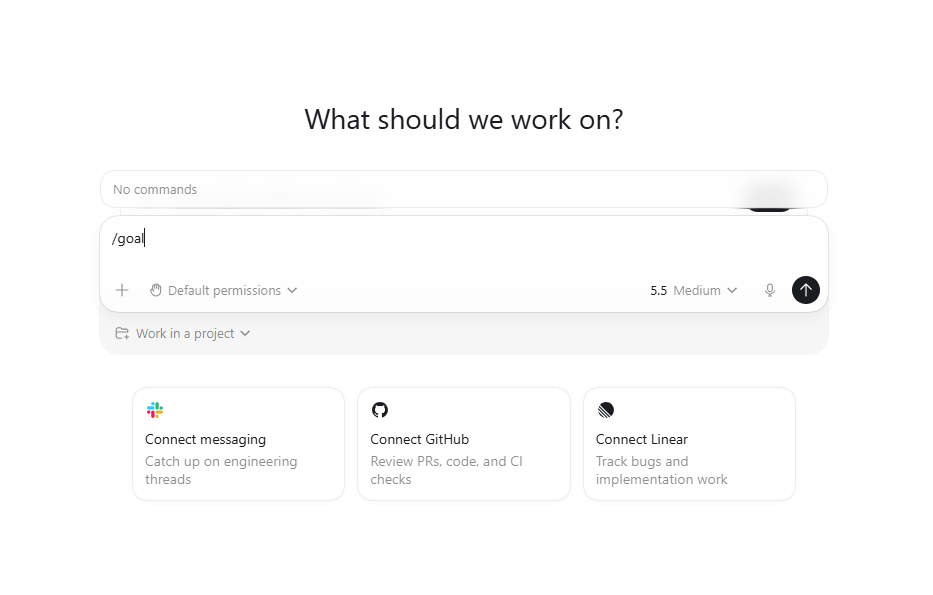
OpenAI's Codex has a slash command called /goal that changes the equation on what you can ask AI to do. The premise is dead simple: you type /goal, then you tell the AI what "done" looks like — and it works until it gets there. It tries something. It tests it. If it fails, it fixes it. It keeps looping until it hits the condition you set. Sessions can run for hours, overnight, or for days. Here's the trap that almost made me give up on this whole story: when you type / in the Codex task box, the autocomplete menu does NOT show /goal. You'll see every other command — Plan mode, Code review, MCP, Memories — but no goal. You'd conclude the feature isn't on your account yet. It is. Type /goal anyway and look for the "Sent as goal" label that appears on your sent message. In the full post: what Codex actually is and how to access it, the UI gotcha in detail, real examples publishers should try this week, and a critical warning if you're on ChatGPT Plus.

There's a command inside OpenAI's Codex called /goal, and once you understand it, the whole conversation about what AI can actually do for you changes.
Here's the premise in one sentence: you type /goal, then you tell the AI what "done" looks like — and it works until it gets there.
Not what to do. Not how to do it. Just the finish line.
Then Codex loops on itself. It tries something. It tests it. If it doesn't work, it fixes it. Then it tries again. And again. And again — until it hits the condition you gave it. The session can run for an hour. It can run overnight. It can run for days if you let it.
Before we get into how to use it, you need to know what Codex even is — because most publishers I talk to haven't met it yet.
First — what is Codex?
If you've used ChatGPT, you've used a chat window. You ask, it answers, end of loop. ChatGPT can write text, summarize, draft emails. What it can't do is reach into your website or your files and actually do the work.
Codex is OpenAI's other product (similar to Anthropic's Claude Code), and it does exactly that. Think of it as ChatGPT with hands. Same intelligence — but pointed at your actual project, where it can read the code that runs your site, change it, test whether the change worked, and keep going until it does.
You get to Codex one of three ways:
- The desktop app (where /goal lives). Download from chatgpt.com/codex on Mac or Windows. Runs locally against folders on your laptop. This is where
/goalworks today — and where it'll keep working longest, against real long-running tasks. - The browser. Sign in to chatgpt.com, then go to chatgpt.com/codex/cloud. Connect a GitHub repo. Good for one-shot delegations and "Plan mode" (a relative of
/goalthat walks you through a plan before executing). But/goalitself isn't available in the browser version yet. - Inside your editor. If your team uses VS Code or Cursor, Codex installs as an extension that runs right alongside the code.
For trying /goal specifically, you want the desktop app.
The UI gotcha you need to know about
Here's the trap that almost made me give up on this whole story: when you type / in the Codex task box, the autocomplete menu does NOT show /goal. You'll see Plan mode, Code review, MCP, Memories, Project, Reasoning — every other command. No goal.
You'd reasonably conclude /goal isn't on your account yet. It is. The slash-menu UI just hasn't caught up to the feature. Type /goal followed by your finish line and hit Enter anyway. Look for the tiny "Sent as goal" label that appears at the bottom-right of your sent message bubble — that's the only confirmation that goal mode actually took.
If you see the label, you're running. If you don't, your version is genuinely behind the rollout.
Why "done" is the only thing that matters
Most AI prompts fall apart because the finish line is vague. "Build me a comment system." Sure — but when is it done? When the form submits? When it handles spam? When it can handle a thousand comments without slowing the page?
/goal forces you to answer that question before you start. And once you've answered it clearly, the AI handles the rest.
A few examples of what a strong /goal looks like:
- "Don't stop until the homepage loads in under 2 seconds on mobile."
- "Don't stop until every PDF in the /editions folder has a searchable thumbnail and shows up in the reader."
- "Don't stop until the newsletter signup form converts above 4 percent on three different page templates."
- "Don't stop until the obituary archive search returns results in under a second, even on a phone."
Notice the pattern. Every one of these is measurable. A specific number. A specific behavior. A specific outcome the AI can test against without your help.
That's the trick. The clearer the finish line, the longer the AI can work without you.
How publishers can actually use this
Two ways to put /goal to work right now:
Fixing what's broken. Flaky search, slow page, form that drops submissions, archive importer that chokes on certain dates — open Codex desktop, type /goal, describe what "working" looks like, hit Enter, walk away. Come back to a fix.
Building from scratch — without being at the keyboard. Drop a plain-English description of what you want into a text file inside your project folder. Something like:
"I want a sidebar widget that shows the three most-read stories from the last week, refreshed every hour, with a small thumbnail next to each headline."
Point Codex at the folder, /goal it, leave it running overnight. Wake up to a working sidebar.
That is not science fiction. That's what's available today.
A real warning about your ChatGPT plan
If you're on ChatGPT Plus ($20/month), be careful what you point /goal at. A goal that runs for hours will burn through your weekly token allowance AND your 5-hour rate limit fast — fast enough to lock you out mid-day. Use Plus /goal for medium tasks (single-afternoon work, well-scoped fixes). Don't leave it grinding overnight.
If you want the honest "let it run for days" workflow, you need ChatGPT Pro ($200/month) or a Business seat, where the rate limits are designed for sustained agent work.
A reasonable Plus rhythm: pick a /goal that should plausibly finish in 30–90 minutes. Watch the first few minutes to confirm it's on the right track. Walk away. Come back to either a done task or a stopped agent waiting for input.
A bonus tip from the Codex community
If the missing autocomplete for /goal bugs you, you can literally ask Codex to fix it. Type "please add /goal to the slash command menu in this GUI app" as a task. Multiple users in the Codex community have confirmed it works — Codex modifies its own UI to expose the command properly.
That is genuinely a new kind of software: an application you can ask to fix itself.
How to try it this week
- Download Codex desktop from chatgpt.com/codex if you don't have it.
- Open a project folder.
- Pick something small — a pagination bug, a broken redirect, a form that needs validation.
- Write the goal in one sentence. Make it measurable.
- Type
/goalfollowed by your sentence. Hit Enter. - Look for the "Sent as goal" label. If you see it, you're running.
- Watch the first 5 minutes to make sure it's on the right track. Then walk away.
The publishers who figure out how to write a good /goal are going to ship work in days that used to take weeks. The ones who don't are going to keep treating AI like a chatbot, and wonder why everyone else is moving faster.
Have a good Memorial Day weekend.
Try this and tell me what happened.
Did it work? Hit reply. Did it come back sounding like a stranger? Hit reply harder. That’s the interesting failure, and it’s almost always fixable.
Get the next one in your inbox
Tuesday brief + Friday deep-dive. Free. Unsubscribe anytime.
Subscribe — free, twice weekly