
|
|
Was this forwarded to you? Get The Fourth Estate AI Brief in your inbox →
|
|
|
|
View this issue in your browser
Friday Deep-Dive
Your hands-free sales assistant just went live
Every AI tool so far has asked you to stop, sit down, and type — which makes them useless in the exact moment a salesperson needs help: in the car, in a lobby, crossing a parking lot with your hands full. This week Anthropic changed that. Claude's rebuilt voice mode can now actually do things while you talk to it — read your email, check your calendar, catch you up on Slack — out loud and hands-free. Below: what changed, five plays for a rep who lives in the field, exactly how to switch it on, and what plan you need (you can start free).
|
|
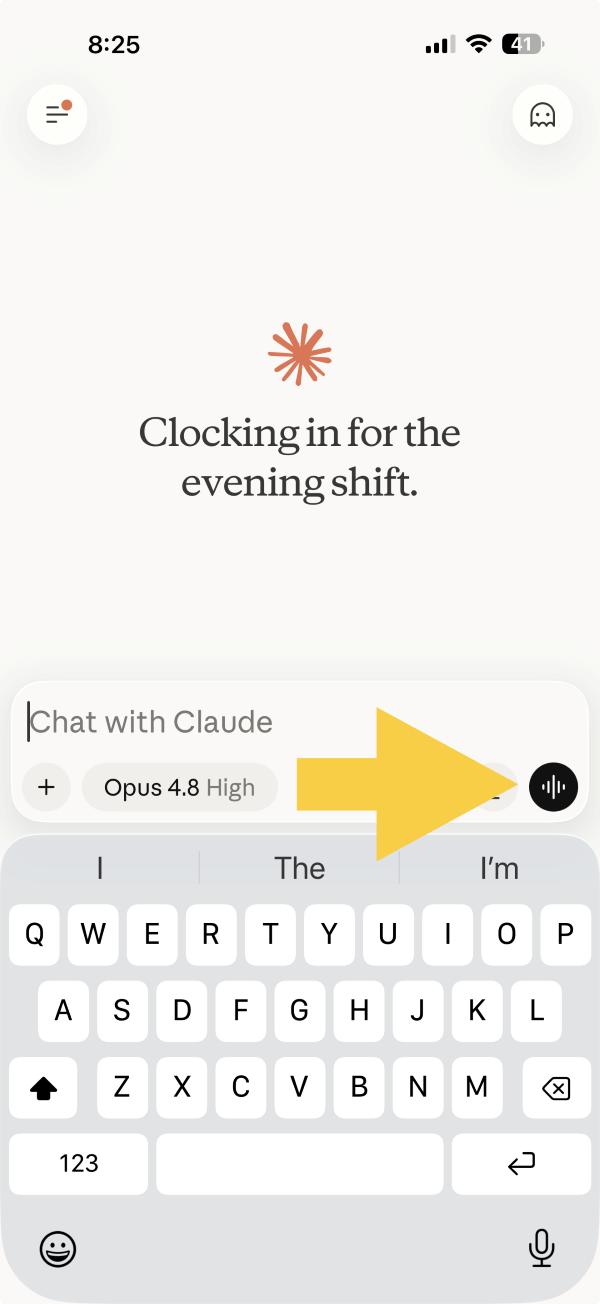
The first AI feature built for people who work in their car
You know the shape of a sales day: in the car, in a lobby, juggling a coffee and a rate card, hands and eyes almost never free. That’s why every “just open the app and type” AI tool has been useless in the moment you actually needed it. This week that changed — Anthropic rebuilt Claude’s voice mode so it can now use your connected apps while you talk to it. Say “catch me up on my email” and it does; ask “what’s on my calendar at 10 and who am I meeting” and it tells you before you walk in. It officially works with Gmail, Google Calendar, Google Docs, and Slack, runs on your phone (where you’ll actually use it), and — the part worth underlining — you can start on the free plan. Below: five plays for a field rep, the 90-second setup, and a plain table of what each plan gets you.
Most AI still assumes you’re sitting at a desk. A salesperson isn’t. This is the first version that meets you where deals actually get made — behind the wheel, between accounts — handling the email and the calendar so you walk in sharp instead of scrambling. The reps who build the habit will get an hour a day back; the rest will still be typing recaps at 6 p.m.
Read the full post →
|
|
What is?
Connectors
What it is: The apps you give Claude permission to use for you — Gmail, Google Calendar, Slack, Google Docs, and hundreds more. Connect one, and Claude can pull from it (and, with your OK, act in it) right inside a chat or a voice conversation, instead of you copying and pasting between windows.
Why publishers care: Connectors are what turn Claude from a smart chat box into an assistant that actually touches your work. The list grows almost weekly — calendars, note apps, design tools, even CRMs — and you can browse the whole directory by job, including a whole category for sales and marketing. Worth a look now and then to see whether the software you already live in has been added.
Visit claude.com →
|
|
|
|
|
|
— Trevor
Trevor Slette
Co-founder, Quadd.ai · 28-year community publisher
trevors@quadd.ai
·
Book a 15-min call
·
LinkedIn
P.S. P.S. Scroll to the bottom of today’s post for a keep-it-in-the-car cheat sheet — the exact words to say for each play, hands-free. Reply “voice” if you’d like it as a printable one-pager.
|
|
|
|
|
Turn PDFs into publishable copy.
Court records, box scores, honor rolls, fair results, meeting minutes — the documents that should not eat up an afternoon. Quadd's Document Intelligence learns your paper's exact layout, then turns the messy files into clean, copy-paste-ready text. Court reports we used to retype for an hour now take three minutes. Same number, every time.
See how Document Intelligence works →
|
|
|